

Table of Contents
- Why Automate Your Law Firm Hiring Process
- Step 1: Map Your Current Hiring Workflow and Identify Bottlenecks
- Step 2: Implement Legal Recruitment Software for Law Firms
- Step 3: Automate Candidate Pre-Screening and Qualification
- Step 4: Use Law Firm Hiring Workflow Templates to Standardize Your Process
- Step 5: Integrate Automation Tools With Your Legal Practice Management Software
- Ethical and Privacy Considerations When Automating Legal Hiring
- Measuring ROI: Cost-Benefit Analysis of Your Automation Investment
Last Updated: August 12, 2026
Why Automate Your Law Firm Hiring Process
Hiring inefficiency costs law firms thousands of dollars monthly. When you’re manually screening resumes, scheduling interviews, checking references, and onboarding new hires, your operations team spends hours on repetitive tasks that could be handled automatically. The real problem isn’t that hiring takes time, it’s that most firms haven’t mapped where that time actually goes or which steps can be eliminated entirely.
Automating your law firm hiring process isn’t about replacing human judgment. It’s about removing the bottlenecks that slow down your ability to bring qualified candidates into your pipeline. When you automate candidate pre-screening, interview scheduling, reference requests, and compliance tracking, you free your team to focus on evaluating fit and culture, the decisions that actually matter.
At Bluebook Helpers, we’ve worked with law firms that were spending 15-20 hours per week on hiring administration alone. After implementing automation, that dropped to 3-4 hours. The candidates moved through the hiring funnel faster, the quality of hires improved, and the cost per placement fell dramatically. This guide covers the exact steps to build that system for your firm.
Start by auditing your current hiring process. Write down every step from job posting to first day onboarding. You’ll be surprised how many steps involve manual data entry, email follow-ups, or waiting for responses. Those are your automation targets.
Step 1: Map Your Current Hiring Workflow and Identify Bottlenecks
Before you implement any automation tool, you need to understand your actual hiring process. Most law firms have never documented it. Partners handle recruitment differently. The operations manager has their own system. Nobody knows exactly how long candidate screening takes or where applications get stuck.
Start by listing every step from job posting through onboarding. Include who’s involved at each stage, how long it typically takes, and what information gets collected or verified. Document the handoffs between people, these are where delays happen. Ask your team: "Where do we lose candidates? Where do we repeat work? What takes the longest?"
Common bottlenecks in law firm hiring include:
- Manual resume screening and qualification assessment
- Scheduling conflicts when coordinating multiple interviewers
- Waiting for reference checks to come back via email
- Duplicate data entry across multiple systems
- Compliance documentation scattered across folders
- No standardized workflow for different practice areas
Once you’ve mapped your workflow, identify the 3-5 steps that consume the most time or create the most friction. These are your priority automation targets. If candidate pre-screening takes 8 hours per week, automate that first. If interview scheduling requires 10 email exchanges, that’s your second priority.

The steps that feel “normal” because you’ve always done them manually are usually the ones that will save you the most time when automated. Don’t automate because it’s trendy, automate because it’s inefficient.
Step 2: Implement Legal Recruitment Software for Law Firms
Legal recruitment software designed specifically for law firms handles the mechanics of hiring in a way that generic HR tools don’t. These platforms integrate with your practice management system, understand legal practice areas, and automate the compliance tracking that matters in a regulated industry.
When evaluating legal recruitment software for law firms, look for platforms that offer applicant tracking system functionality, workflow automation, and integration with your existing systems. The best legal recruitment software for law firms combines candidate relationship management with automated follow-up, so prospects stay engaged even when you’re not actively recruiting.
Key features to prioritize:
- Applicant tracking system that organizes candidates by practice area and seniority level
- Customizable workflow templates for different hiring scenarios (associate, paralegal, contract attorney)
- Integration with your legal practice management software to avoid duplicate data entry
- Automated candidate communication and follow-up sequences
- Compliance tracking for hiring documentation
- Reference request automation with standardized templates
The software should allow you to build a talent pool of candidates who weren’t right for the current opening but might fit future positions. This is where candidate relationship management becomes valuable, you’re not starting from scratch every time you hire.
Avoid generic HR platforms that don’t understand legal hiring. They lack the practice area taxonomy, the compliance requirements, and the integration points you need. You’ll end up building workarounds instead of using the tool as designed.
Step 3: Automate Candidate Pre-Screening and Qualification
Pre-screening is where most law firms waste time. Partners and hiring managers review hundreds of resumes manually, looking for the same basic qualifications each time. Automating this step alone can cut your time-to-hire by 40-50%.
Set up automated pre-screening workflows that evaluate candidates against your standardized criteria. Define what "qualified" means for each position: years of experience, specific practice areas, bar admission status, relevant skills. Build a workflow that automatically flags candidates who meet these thresholds and routes them to the next stage.
Behavioral interviewing principles apply here too. Rather than just screening for credentials, ask screening questions that reveal work style and problem-solving approach. Many platforms allow you to send automated screening questionnaires that candidates complete before a human ever reviews their file. This creates a second layer of qualification that doesn’t require your time.
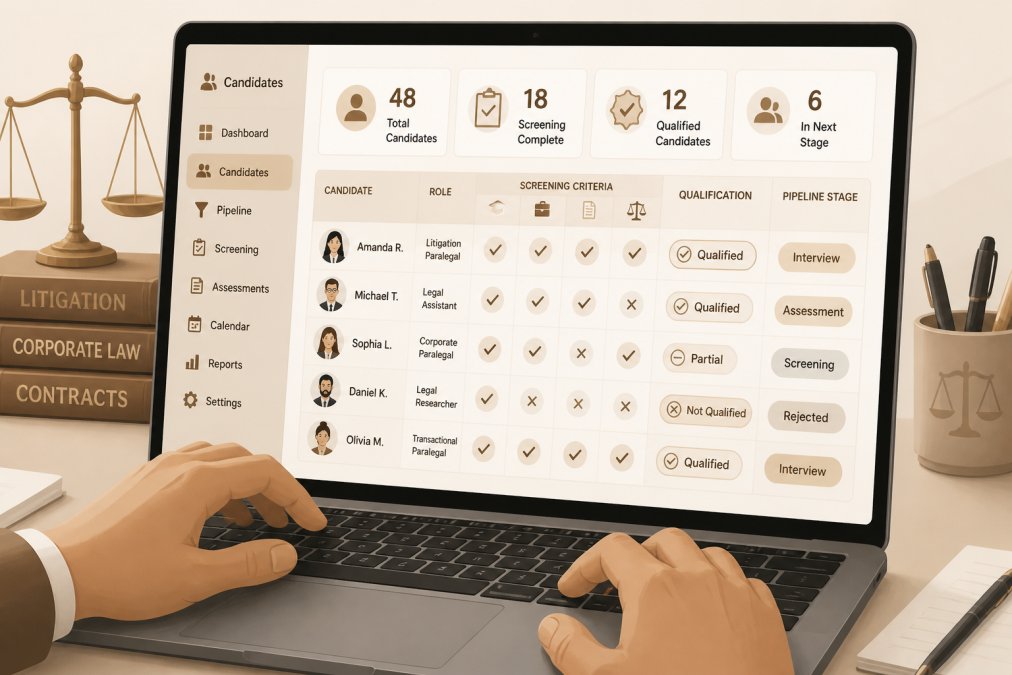
The screening discrepancies that emerge here are actually valuable. If five candidates have identical credentials but different screening question responses, those responses tell you something real about fit. Automate the credential check, then use the questionnaire responses to inform your interview decisions.
Common automated screening criteria for law firms:
- Years of practice in specific areas
- Bar admission and good standing
- Specific software proficiency (document automation, legal research platforms)
- Geographic flexibility for remote positions
- Availability start date
- Willingness to work on specific case types
Sentiment analysis tools can even evaluate tone in written responses, helping you spot candidates who communicate clearly versus those who don’t. This isn’t about replacing human judgment, it’s about letting the system filter out obvious mismatches so your team focuses on real candidates.
Step 4: Use Law Firm Hiring Workflow Templates to Standardize Your Process
Standardized workflows prevent hiring decisions from being inconsistent or biased. When every candidate goes through the same steps in the same order, you’re comparing apples to apples. Law firm hiring workflow templates create that consistency while still allowing flexibility for different roles.
Build separate workflow templates for different hire types: junior associates, experienced associates, paralegals, contract attorneys, and support staff. Each template should include the same stages: application, pre-screening, phone screen, formal interview, reference check, offer, and onboarding. The time allocated and decision criteria may differ, but the structure stays consistent.
Include decision gates in your workflow. After each stage, the system should require a documented decision: move forward, request more information, or reject. This creates an audit trail that protects your firm if hiring decisions are ever questioned. It also forces clarity, you can’t accidentally leave someone in limbo.
Standardized workflows also make it easier to delegate hiring tasks. When a workflow is documented and automated, a paralegal or operations manager can run the process without constant partner involvement. Partners focus on final interviews and offers. Everyone else handles the mechanical steps that don’t require legal judgment.
Build your law firm hiring workflow templates based on what actually works, not what sounds good. Run one full hiring cycle with your template, then refine it. The second cycle will be measurably faster because you’ve eliminated the guesswork.
Step 5: Integrate Automation Tools With Your Legal Practice Management Software
The reason most law firm hiring automation fails is that data doesn’t flow between systems. You screen candidates in your applicant tracking system, then manually enter their information into your practice management software. You schedule interviews in a calendar app, then email the details separately. The automation creates new work instead of eliminating it.
True efficiency comes from integration. Your applicant tracking system should sync with your legal practice management software so candidate information flows automatically. Interview scheduling should update your calendar and send notifications without manual intervention. Reference checks should populate compliance documentation automatically.
When evaluating integration options, prioritize these connections:
- ATS to legal practice management software (candidate data syncs automatically)
- Interview scheduling to calendar and email systems
- Reference request automation to compliance tracking
- Offer letter generation from template data
- Onboarding checklist automation based on hire type and start date
Some integrations happen through native connectors built into the software. Others require middleware or API connections. The technical complexity matters less than the result: data moves between systems without human intervention.
Legal practice management software integration is critical because it ensures your new hire’s information is already in your systems on day one. Their profile, their practice areas, their billing codes, it’s all there. This reduces onboarding friction and lets you start productive work faster.
Ethical and Privacy Considerations When Automating Legal Hiring
Automation in hiring creates risks that manual processes don’t have. When you’re using sentiment analysis, AI-powered screening, or behavioral prediction tools, you need to understand what those systems are actually doing and whether they introduce bias.
The biggest risk is automation bias, assuming that because a system is automated, it must be objective. It’s not. If your screening algorithm was trained on data from your past hiring, it will replicate whatever biases existed in those decisions. If your legal recruitment software uses AI to predict job performance, you need to understand what factors it’s weighing and whether any of those factors correlate with protected characteristics.
Transparency matters. Candidates should know they’re being screened by automation. They should have a way to appeal or request human review if they’re rejected automatically. This isn’t just ethical, it’s increasingly a legal requirement. Various jurisdictions have begun regulating AI in hiring, and transparency is usually a baseline requirement.
Data security is non-negotiable in legal hiring. Candidate information includes Social Security numbers, bar admission details, and sometimes sensitive background information. Your automation tools must encrypt this data, limit access, and maintain audit logs. If you’re using a cloud-based applicant tracking system, verify that it meets your firm’s security standards and complies with relevant data protection regulations.
Reference checking automation creates a specific compliance issue. When you send automated reference requests, you need clear disclosure about how the information will be used and who will have access. Some jurisdictions have specific rules about reference verification in professional hiring. Know your local requirements before automating this step.
Automated reference checking can create liability if the system doesn’t properly verify the identity of the person providing the reference. A fake reference that passes through your automated system creates the same exposure as if you’d accepted it manually. Build in verification steps even in automated workflows.
Measuring ROI: Cost-Benefit Analysis of Your Automation Investment
The financial case for automation is usually clear, but only if you measure it correctly. Track three metrics: time saved, cost per hire, and time-to-hire.
Time saved is the easiest to measure. Before automation, how many hours per week does your team spend on hiring tasks? After automation, how many hours? The difference is your time savings. Multiply that by your team’s loaded hourly cost (salary plus benefits), and you have an annual dollar value for the time savings.
Cost per hire includes recruiting costs, interviewer time, and administrative overhead. Calculate your current cost per hire, then track it monthly after implementing automation. Most firms see this drop by 20-30% within the first three months because the time investment per candidate falls dramatically.
Time-to-hire measures how long it takes from job posting to offer accepted. Faster time-to-hire means you fill positions quicker, which means you’re billing sooner and your team isn’t overworked. The financial benefit of reducing time-to-hire by 50% is substantial, you’re essentially adding capacity without adding headcount.
When evaluating the cost-benefit of your automation investment, include:
- Software subscription costs
- Integration and setup time (usually a one-time cost)
- Training time for your team
- Time savings per hire
- Reduction in hiring errors or bad fits
- Faster time-to-fill for open positions
Most law firms break even on hiring automation within 3-6 months. After that, it’s pure efficiency gain. The secondary benefit, better hiring decisions because you’re not rushing through the process, is harder to quantify but just as real.
Automating your law firm hiring process removes the administrative friction that slows down your ability to grow. When you map your workflow, implement the right tools, and integrate them with your existing systems, you create a hiring machine that works consistently without constant manual intervention. Bluebook Helpers specializes in helping law firms build these systems and then staffing them with trained legal professionals who understand your firm’s specific needs. The result is faster hiring, lower overhead, and the capacity to take on more work without expanding your physical footprint. Book a consultation to see how automation can work for your firm’s specific hiring challenges.
Frequently Asked Questions
What parts of the legal hiring process should be automated first?
Start with high-volume, repetitive tasks: candidate pre-screening based on credentials, interview scheduling, and reference requests. These automation steps eliminate bottlenecks without requiring human judgment on legal expertise. Once those are running smoothly, expand to automated follow-up emails, document generation for offer letters, and compliance tracking. Prioritize tasks that currently consume the most staff time and have clear, objective criteria.
How do you maintain a personal touch while automating law firm hiring?
Automate the administrative work, not the relationship-building. Use workflow automation for scheduling, follow-ups, and document prep, but keep initial outreach, interviews, and final offer conversations personal. Automated candidate relationship management (CRM) tools track interactions and send timely messages, but personalize them with specific details about why the candidate fits your firm. This balance speeds your hiring pipeline while candidates still feel valued.
What are the risks of using automation in legal recruitment?
The main risks are bias in screening algorithms, data privacy breaches with sensitive candidate information, and over-reliance on automated decisions without human review. Legal hiring involves confidentiality and compliance requirements. Mitigate these by auditing your screening criteria for bias, ensuring your recruitment technology meets data protection standards, and maintaining human oversight on final hiring decisions. Never let automation make the decision alone, use it to filter and organize candidates, not replace judgment.
How can AI tools improve law firm recruitment efficiency?
AI-powered recruitment tools reduce time-to-hire by analyzing candidate resumes against your job requirements, identifying top matches automatically, and flagging red flags or inconsistencies. Sentiment analysis in candidate communications can reveal engagement levels. AI can also generate interview questions tailored to your firm's practice areas and predict which candidates are most likely to succeed based on historical hiring data. The result is faster screening, fewer manual reviews, and more data-driven hiring decisions that reduce bad hires.

